LSENLTY's CO2 Monitor Came Back to Life Thanks to Godlike Support, So I Hooked It Up to Homepage

Table of Contents
This is a story about how LSENLTY’s customer support was godlike.
Background
About two years ago, on a whim, I bought a smart CO2 monitor.

↑ Not an affiliate link, so rest easy.

It measures CO2 concentration, temperature, and humidity, and you can view the results, history included, from a smartphone app.
When buying a CO2 monitor, I also considered the better-known SwitchBot CO2 monitor.
But the LSENLTY above is…
- Cheaper
- Easier to read
- A friend uses the SwitchBot CO2 monitor, and I found it hard to read since it has no backlight or anything
- More responsive
- The SwitchBot one apparently reacts slowly to changes in CO2 concentration, maybe because its air intake is small (see the article below)
So, even though a mystery manufacturer was a bit scary, I steeled myself and went with the LSENLTY CO2 monitor.
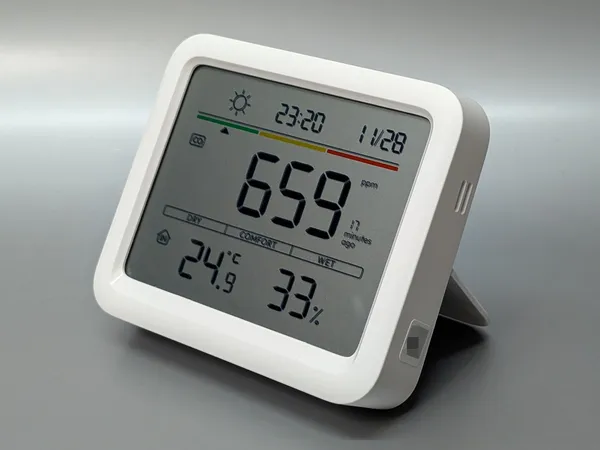
The Wi-Fi Won’t Connect Problem
For a while right after purchase, I could connect to Wi-Fi through the app without any trouble, but at some point it stopped connecting properly.
At that time, though, I hardly used the feature of connecting to the network and checking values in the app, so I figured it was fine, ignored the “smart” part, and just used it as a plain CO2 monitor.
I have hardly any other smart devices, so going out of my way to open a dedicated app just for the CO2 monitor was a real hassle, and just looking at the monitor itself was faster.
However, my recent home server hobby changed the situation.
With Home Assistant, you can visualize data from pretty much any smart device in your home. I really wanted to use that.
So I set out to make this CO2 monitor smart again, but nothing worked.
Here’s what I tried. I did everything while connected to a 2.4 GHz Wi-Fi network, with the app allowed to use location, Wi-Fi, and Bluetooth.
- The device registration was still there, so I unregistered it from the app and registered it again
- → Failed
- Used the Tuya app instead of Smart Life
- → Failed
- Restarted the phone
- Long-pressed the ”-” button to enter network setup mode, then double-clicked the ”-” button again
- → No change
- Stuck a toothpick into the tiny hole to reset it
- → The screen on the CO2 monitor just goes blank while I hold the button, and it doesn’t seem to actually reset
- Unplugged the charger and left it until the battery ran out, then connected after it died
- → Failed
- Used a family member’s iPhone to connect to my home Wi-Fi
- → Failed
- Used a friend’s iPhone to connect to the Wi-Fi at my friend’s place
- → Failed
If it still fails after all that, it can only be a fault on the device side.
I thought about buying a new one, but before that I decided to consult the support center, figuring I had nothing to lose.
Godlike Support
I translated the above into English and emailed the LSENLTY support center asking whether there was anything else I could try, and they replied the same day.
- If you’d like to try our product again, give us your address and we’ll send you a brand-new one (!!!)
- To investigate the problem, please send us photos or videos
What godlike support. I have no complaints at all about the product’s features or design, so I was delighted. I sent my address and a video of it failing to connect, and the next day they told me it had shipped.
Two days after that, the new CO2 monitor arrived. Way too fast.
By the way, I only noticed afterward that the official shop lists a 5-year warranty.
We provide a 5-year warranty on all LSENLTY products. If you have any questions, please contact us at support@lsenlty.com. We will respond within 24 hours.
I couldn’t find it on the Amazon product page, but maybe this warranty policy is why they treated me so well.
Comparison
Comparing the new unit with the CO2 monitor that had stopped being smart, the outer shell is almost identical, but the specs are quite different.
- There’s a slightly stylish animation at startup
- A green LED lights up when you plug in the charging cable
- The alert threshold concentration can be set more finely
- It has an auto-calibration feature (I think the old one didn’t have it)
- Double-tapping in network setup actually works
And so on; overall it’s even more convenient. Maybe the firmware got updated.

The one that stopped being smart is on the left, the new one on the right. The color might be slightly different too?
Visualizing the Data with Home Assistant and Homepage
And of course, the actual main point, the Wi-Fi connection, was done super easily.
I picked the Tuya integration in Home Assistant, scanned the QR code with my phone to link it, and now my home server can pull the CO2 monitor’s data without a hitch.

Next, I added this to Homepage as a widget.
Using the PR below as a reference, I modified Noelle’s entry to show 2 LXC container metrics plus 8 Home Assistant metrics.


- Home Assistant: # 3. Noelle's individual status + HA widgets - Noelle: icon: /images/noelle.png href: '{{HOMEPAGE_VAR_HA_URL}}' description: Home automation proxmoxNode: '{{HOMEPAGE_VAR_PROXMOX_NODE}}' # Proxmox status proxmoxVMID: 101 widgets: # Changed "widget" to "widgets" - type: homeassistant # First widget (weather info) url: '{{HOMEPAGE_VAR_HA_URL}}' key: '{{HOMEPAGE_VAR_HA_TOKEN}}' custom: - {state: 'weather.forecast_home', label: '天気', icon: 'mdi:weather-partly-cloudy', value: '{state}'} - {state: 'weather.forecast_home', label: '気温', icon: 'mdi:thermometer', value: '{attributes.temperature} {attributes.temperature_unit}'} - {state: 'weather.forecast_home', label: '湿度', icon: 'mdi:water-percent', value: '{attributes.humidity} %'} - {state: 'weather.forecast_home', label: '気圧', icon: 'mdi:gauge', value: '{attributes.pressure} {attributes.pressure_unit}'}
- type: homeassistant # Second widget (indoor environment) url: '{{HOMEPAGE_VAR_HA_URL}}' key: '{{HOMEPAGE_VAR_HA_TOKEN}}' custom: - {state: 'switch.desktop_light', label: 'デスクライト', icon: 'mdi:desk-lamp'} - {state: 'sensor.pth_9cw_qc_temperature', label: '室温', icon: 'mdi:thermometer', value: '{state} ℃'} - {state: 'sensor.pth_9cw_qc_humidity', label: '湿度', icon: 'mdi:water-percent', value: '{state} %'} - {state: 'sensor.pth_9cw_qc_carbon_dioxide', label: 'CO2', icon: 'mdi:molecule-co2', value: '{state} ppm'}
Perfect. Nothing more to say.
I have no plans to do any of it at the moment, but this brings me a lot closer to an IoT-ish future like:
- Turn on the air conditioner when the room temperature exceeds a threshold
- Turn on the humidifier when the humidity exceeds a threshold
- Send a desktop notification when CO2 exceeds a threshold (the unit’s own alarm is way too loud)
- Send a desktop notification when CO2 exceeds a threshold even though nobody should be home
…and so on.
Conclusion
I recommend LSENLTY’s CO2 monitor. Honestly, I was pretty suspicious of a CO2 monitor from an unknown, (probably?) Chinese manufacturer, but I’m very satisfied overall.
I don’t own CO2 monitors from other makers, so I can’t compare, but if I keep the windows shut, the value really does climb steadily, and if I breathe on it or hold a carbonated drink near it, it hits 5000 ppm instantly, while holding alcohol near it doesn’t change the value at all, so it should be properly measuring carbon dioxide concentration.
(In cheap fakes, instead of measuring carbon dioxide directly, the CO2 level is estimated from the readings of a sensor for some other substance, so holding alcohol near them makes them wrongly conclude that the CO2 level went up.)
Hold a hand sprayed with disinfectant alcohol near the sensor and check that the CO2 concentration does not rise. If it rises significantly, it is highly likely that the device uses a pseudo-sensor that responds to gases other than CO2, so we recommend not using it for ventilation monitoring as an infection control measure.

Design-wise, I also like the hard-boiled coolness of a black screen with a big four-digit number slapped on it, updating roughly every 3 seconds; it feels like it’s really monitoring things.
And above all, the support was godlike. They respond ridiculously fast, and I never expected them to send me a brand-new unit. I’m truly grateful. I wrote this article to work off that karma.
By the way, although it’s called a CO2 monitor, it also measures temperature and humidity, and that turns out to be quite handy too. In winter, if humidity drops below 40%, I put up a wet towel to avoid waking up with a sore throat, that kind of care.
If you haven’t got a CO2 monitor yet, please give one a try. If you feel spaced out while working with the windows shut, it might be the carbon dioxide concentration.
With multiple papers saying that cognitive function declines significantly once CO2 concentration exceeds 1000 ppm, if you find the CO2 concentration in your room is over 3000 ppm, I guarantee you’ll be appalled that you’ve been living in an environment like that all this time.
(Seriously, isn’t carbon dioxide concentration the cause of most of the sleepiness in offices, classrooms, and cars? I wish the practice of monitoring it properly and ventilating appropriately would spread more.)
And if you’re going to buy one, I recommend LSENLTY’s CO2 monitor.
↑ Not an affiliate link, so rest easy (reposting).
More articles
- I Went Looking for Legal Absinthe, Drank Sage Tea Instead, and Ended Up Staring Into the Abyss of Herbs• #Life HacksA diary entry, my first in a while, about how I'm getting drawn into the world of herbs like sage and basil.

- Noelle Reporting for Duty! (Building the AI Agent Ineffa)• #HomelabA record of how the Clawdbot-based AI agent "Ineffa (Noelle)" overcame a series of troubles and finally went live.

- Guarding the Heart, or a Lightning Flash of Admonition• #HomelabAn unsettling short story written by Gemini 3 Pro Preview.
- Noelle Has Come to My Home• #HomelabBy combining Home Assistant, the Wyoming Protocol, Style-Bert-VITS2 and more, I turned my home server into a Noelle smart speaker.


Notes on games, radio and technology, translated from the Japanese blog.